Offline Lyrics on iPhone: Synced, Text, and Embedded
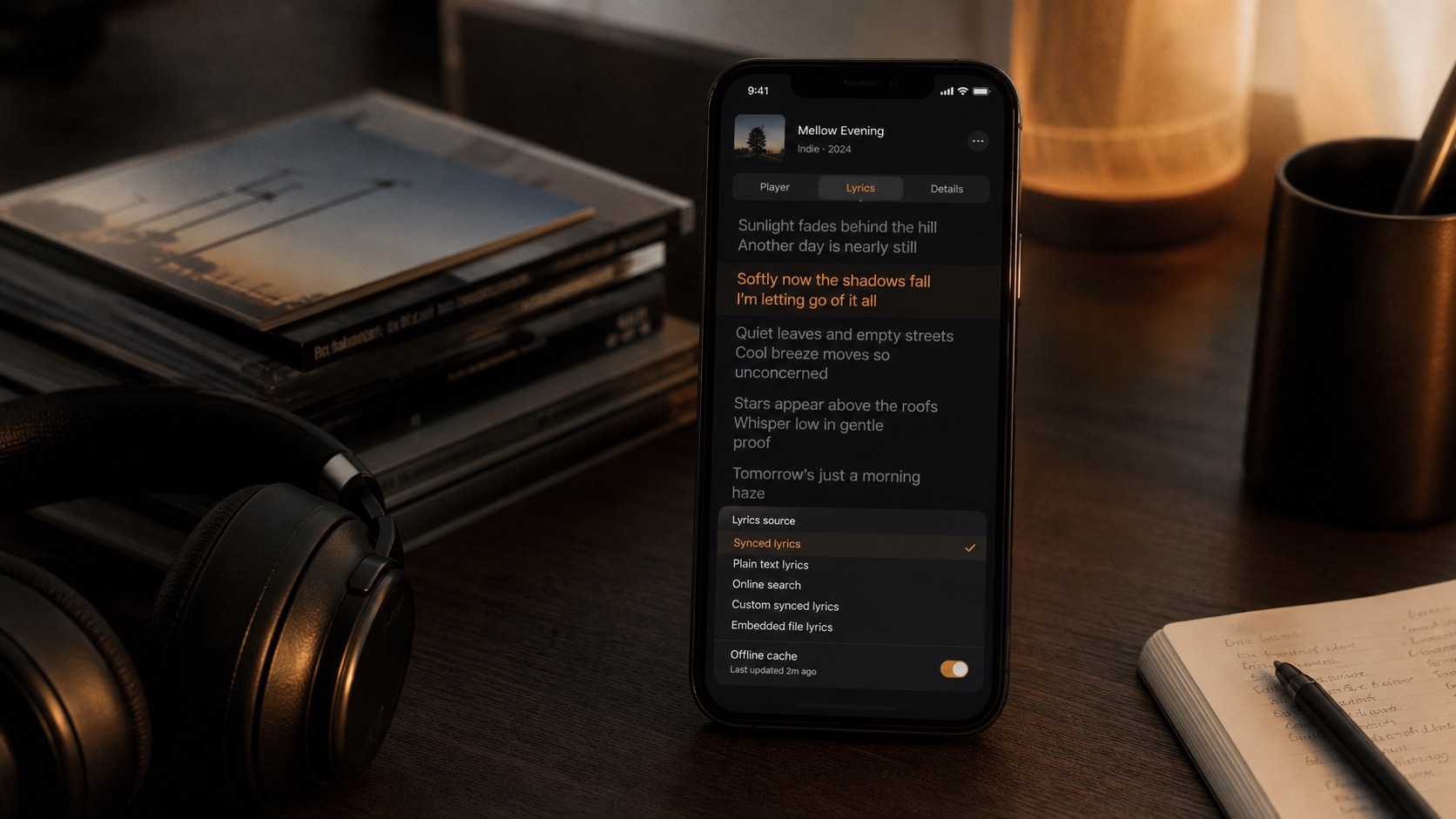
OfflineTunes Lyrics can play synced LRC-style lyrics, plain text lyrics, embedded file lyrics, fetched online lyrics, custom synced lyrics, and cached lyrics that keep working offline.
In this article Open
Lyrics are usually treated like streaming decoration. They appear when service has license, disappear when connection drops, and rarely belong to file you actually own. That is backwards for local music library. If songs are offline, lyrics should be offline too.
OfflineTunes Lyrics are built around that idea. App can read embedded lyrics from local files, fetch lyrics online when metadata is enough to find match, show synced lyrics in time with playback, fall back to plain text lyrics, let you paste or import lyrics, help create synced lyrics, and cache fetched results so they keep working after first successful lookup.
This guide explains how those pieces fit together and when each one matters.
Why Offline Lyrics Matter
Offline music listeners already know value of keeping files local: albums keep playing in airplane mode, in dead zones, in cars, and anywhere streaming library gets weird. Lyrics deserve same treatment. They are part of how people learn songs, sing along, study language, compare versions, and remember what track is actually saying.
Best case is simple: press lyrics button and words appear. But real local libraries are messy. Some files have embedded lyrics. Some have no tags. Some need online search. Some only have unsynced text. Some need timing fixed. Some rare mixes need hand-made lyrics because online databases point to wrong version.
OfflineTunes handles those cases as separate sources instead of pretending there is one perfect lyrics path.
Four Lyric Sources in One Place
OfflineTunes Lyrics can use embedded, online, imported, and custom lyrics. That gives you quick setup when database result is good and deep control when your files need cleanup.
Embedded Lyrics
Lyrics stored inside local audio file tags. Good for permanent libraries, backups, and device moves.
Online Lyrics
Lyrics fetched by title, artist, album, and duration. Good when file has clean metadata.
Imported .LRC
Synced lyric files can be imported when you already have timing from another source.
Custom Lyrics
Paste text, refine search, edit timing, and save your own synced version when no result fits.
Synced Lyrics and Plain Text Lyrics
Synced lyrics are timed. Each line has timestamp data, usually LRC-style timing, so OfflineTunes can highlight current line while track plays. Tap timed line to jump playback to that moment. When word-level timing is present, app can highlight individual words too.
Plain text lyrics are simpler. They are useful for liner-note style reading, old files, demos, voice notes, live recordings, and tracks where timing is not worth maintaining. OfflineTunes keeps plain text view available because not every useful lyric needs karaoke timing.
That split matters. For singing along, practicing, or language study, synced lyrics are better. For archive notes, rough drafts, rare songs, or tracks with changing live arrangements, plain text may be enough.
Synced lyrics need matching versions
Duration matters because album edits, radio edits, remasters, live cuts, and bonus tracks can share title and artist while having different timing. OfflineTunes scores online results with track title, artist, album, duration, and whether result includes synced or word-synced data. If multiple matches are available, you can choose result instead of accepting wrong one.
Fetch Synced Lyrics Online
When local file does not already contain lyrics, OfflineTunes can fetch lyrics online. It reads track metadata, searches for matching lyrics, and prefers synced lyrics when available. The online lookup uses song details such as title, artist, album, and duration so exact versions have better chance of winning.
If first result is not right, refine search or choose another search result. This is important for libraries with remixes, deluxe editions, cover versions, compilation tags, or files where artist names are inconsistent. The app also includes direct search options so you can investigate lyrics manually when metadata is not enough.
Create Your Own Synced Lyrics
Online lyric databases are useful, but they do not cover every file. OfflineTunes lets you create synced lyrics from text when you need control. Paste lyrics, open Sync Lyrics, play track, step through lines, set timing, preview sections, adjust offset, and save synced result.
That workflow is useful for live recordings, demos, rare imports, personal recordings, alternate mixes, and songs where online timing is close but not close enough. Once synced text is saved, OfflineTunes treats it like usable lyrics for playback instead of loose notes.
You can also import an existing .lrc file. If file is valid synced lyrics, OfflineTunes can load it, cache it, and offer to embed it into local file.
Offsets help when timing is close
Sometimes lyrics are synced but early or late by small amount. OfflineTunes includes offset controls and auto-detect flow so you can correct playback alignment without rewriting every line. If timing is completely wrong, create or import better synced lyrics instead.
Embed Lyrics Directly in Local Music Files
Caching is good. Embedding is stronger when you want lyrics to become part of file. OfflineTunes can write current lyrics into supported local audio file tags, using plain lyrics or exported synced LRC text depending on current lyric data.
Embedded lyrics are useful because they follow file. If you back up library, move songs, or rebuild phone, lyric text has better chance of coming along with music instead of living only in app cache. This fits same philosophy as good tags and artwork: local files should carry their own useful metadata.
There is one important caveat: embedding applies to local files OfflineTunes can write tags to. Apple Music tracks do not expose local files for tag writing, so app hides embed controls for those tracks.
Remove embedded lyrics when needed
If embedded lyrics are wrong or stale, OfflineTunes can remove embedded lyric fields from supported local files. That keeps bad old lyrics from overriding better online or custom lyrics later.
Offline Cache After First Fetch
Fetched lyrics are cached by track. After a successful online lookup or selected search result, OfflineTunes stores lyrics data in local lyrics cache. That means first fetch needs internet, but later playback can show same lyrics without asking network again.
This is especially useful for travel. Before flight or road trip, open lyrics for albums you care about while online. Once lyrics are fetched, cached results can load alongside offline music library. You do not need to refetch every time you play song.
Imported and custom synced lyrics are cached too. When you save your own synced lyrics, OfflineTunes stores result so it is available on next open.
Cache vs embed
Cache keeps fetched or custom lyrics available inside OfflineTunes after first lookup. Embed writes lyrics into supported local file tags, which is better for long-term library portability.
Best Lyrics Workflow for Offline Libraries
For most songs, start with fastest path and only add permanence when lyrics are worth keeping.
- 1Open lyrics on cleanly tagged track.Let OfflineTunes read embedded lyrics first or fetch online lyrics using track metadata.
- 2Check synced view and plain text view.Use synced lyrics when timing is useful. Use plain text when reading is enough.
- 3Choose another result if timing is wrong.Use result picker or refined search for remasters, edits, covers, and messy metadata.
- 4Create synced lyrics when none fit.Paste text, sync lines to playback, preview timing, and save custom lyrics.
- 5Embed important lyrics into local files.Use embed for files you want to preserve across backups, imports, and future devices.
- 6Cache before you go offline.Open lyrics once while online. Fetched and selected lyrics then stay available from local cache.
Where Lyrics Fit in OfflineTunes
Lyrics are part of bigger local-library system. Local file playback gets music onto iPhone without old sync pain. Tag editing cleans names, albums, artwork, and metadata. Bookmarks and A-B Loop help save moments inside tracks. Lyrics add words, timing, and context.
For casual listening, fetched text may be enough. For serious library ownership, embedded synced lyrics are better. They make file more complete: audio, artwork, tags, and words all together.
Bottom line
OfflineTunes Lyrics are built for ownership. Fetch lyrics when available, read synced or plain text, create timing when database misses, embed lyrics into supported local files, and rely on cache once lyrics have been fetched.