Music Bookmarks on iPhone: Save Moments and Loop Sections
OfflineTunes Bookmarks let you save exact moments inside a song, jump back later, link two points into an A-B loop, and export a focused section when supported.
In this article Open
A normal music player remembers songs. A useful local music player remembers moments inside songs. That is the difference between knowing you like a track and knowing the exact spot where the chorus lifts, the solo starts, the language phrase repeats, the drum break begins, or the section you need to practice starts getting difficult.
OfflineTunes Bookmarks are built for that second kind of listening. You can save the current playback time, name it, jump back to it later, connect two adjacent bookmarks into an A-B loop, and on supported devices export that loop as its own section. It is a small feature until you need it. Then it becomes one of the fastest ways to study, practice, rehearse, and organize local audio.
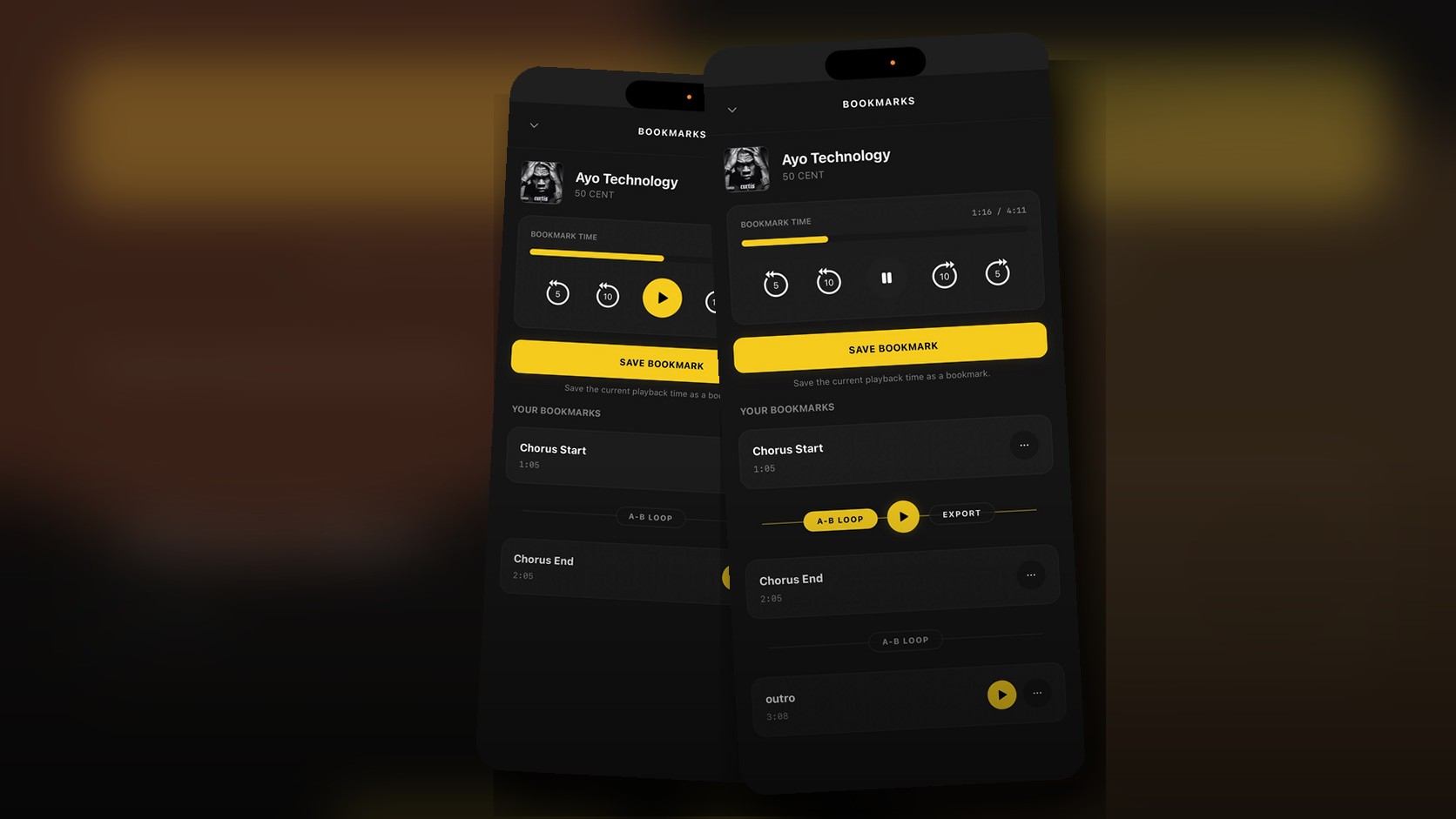
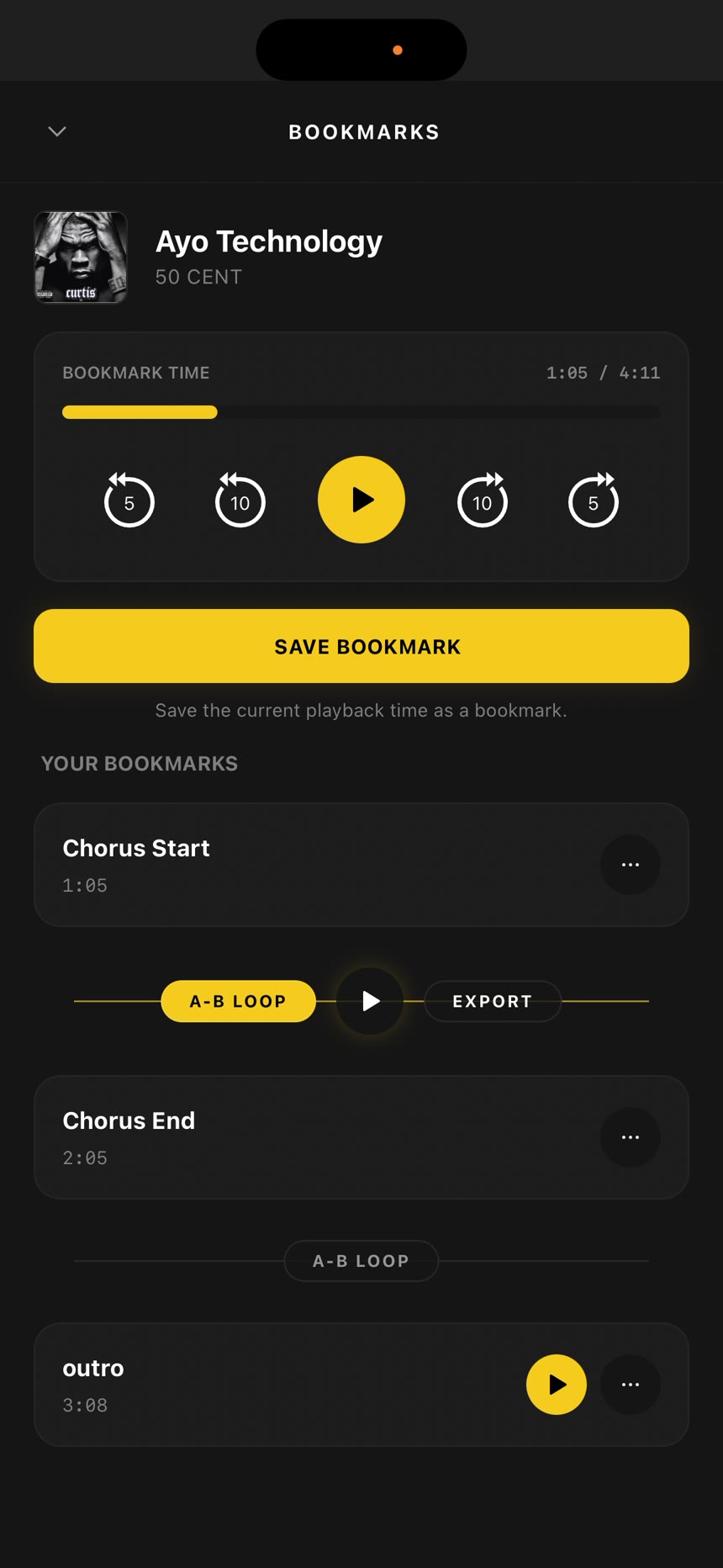
This guide uses a real demo capture of the Bookmarks feature. The screenshots below show the current flow: opening bookmarks from playback, saving named moments, building an A-B loop, playing that loop, and exporting the range when available.
What Bookmarks Are
A bookmark is a named timestamp saved to a track. Instead of scrubbing around a waveform or guessing where a section begins, you save the moment once and return to it with one tap. Each bookmark has a label and a time, and the bookmark list is kept in track order so the song becomes a timeline you can read.
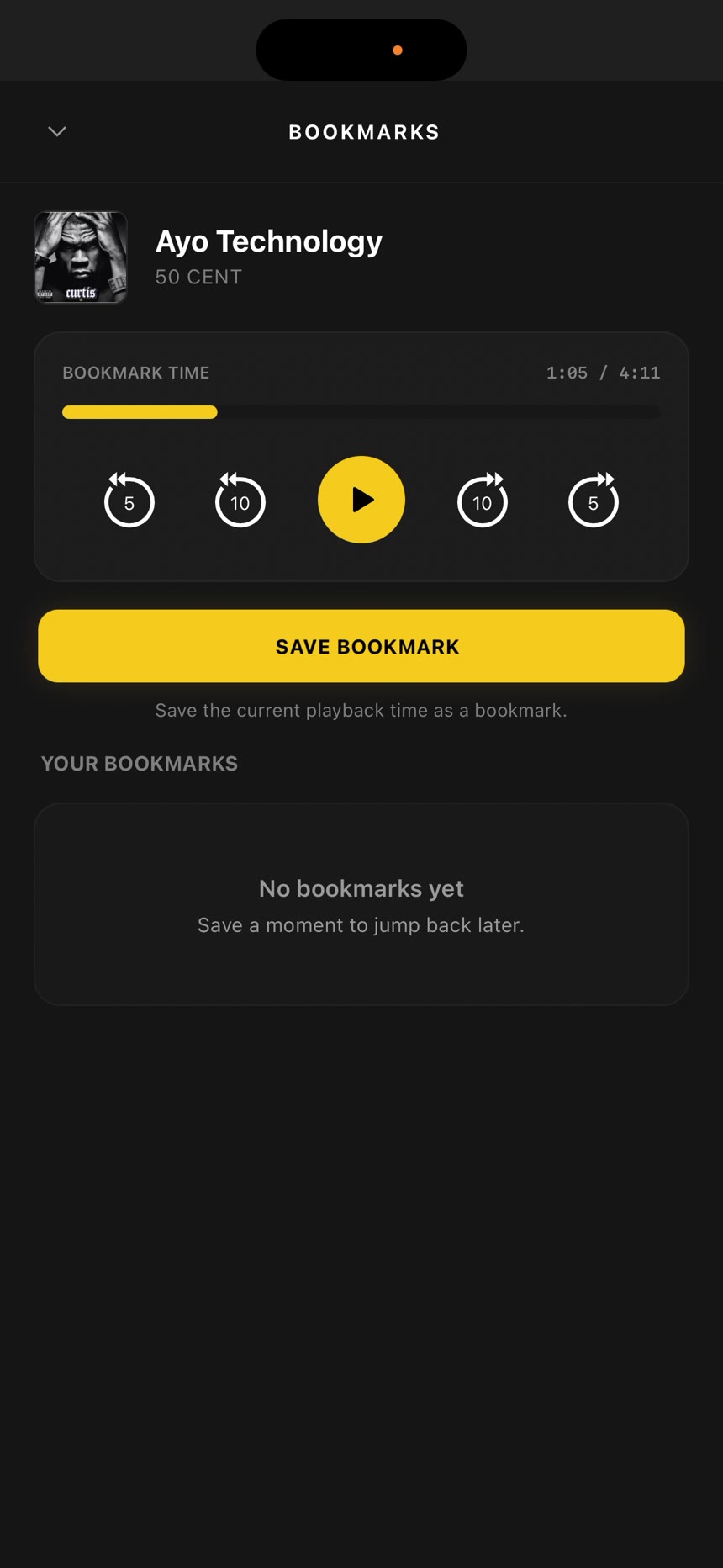
Inside OfflineTunes, the Bookmarks screen gives you a compact playback panel, skip controls, current time, save button, and your saved bookmark list. Tapping a saved bookmark jumps playback to that point. The options menu lets you rename or delete a bookmark when the label is wrong or the moment is no longer useful.
Bookmarks are not playlists
Playlists collect tracks. Queues plan the next listening session. FineTune helps decide which songs should stay in your library. Bookmarks work at a smaller scale: they mark useful locations inside one track.
That distinction matters. A playlist can remember that a song belongs in a workout mix. A bookmark can remember where the sprint section starts. A playlist can hold a guitar practice set. A bookmark can jump directly to the hard phrase. A playlist can hold a DJ prep folder. A bookmark can mark the clean intro, vocal drop, and outro cue.
Save Named Moments Instead of Scrubbing Forever
The basic bookmark flow is intentionally short: find the moment, tap Save Bookmark, name it, and keep listening. The name is the important part. A vague label like "Bookmark" works for one or two points, but real libraries benefit from labels that explain why the moment matters.
Good labels are short and functional: "Chorus Start", "Chorus End", "Solo", "Bridge", "Clean Intro", "Vocal Drop", "Hard Phrase", "Warmup Loop", "Verse 2", "Outro", or "Export Start". If you are using bookmarks for study, label the goal. If you are using bookmarks for music prep, label the section.
Jump Back
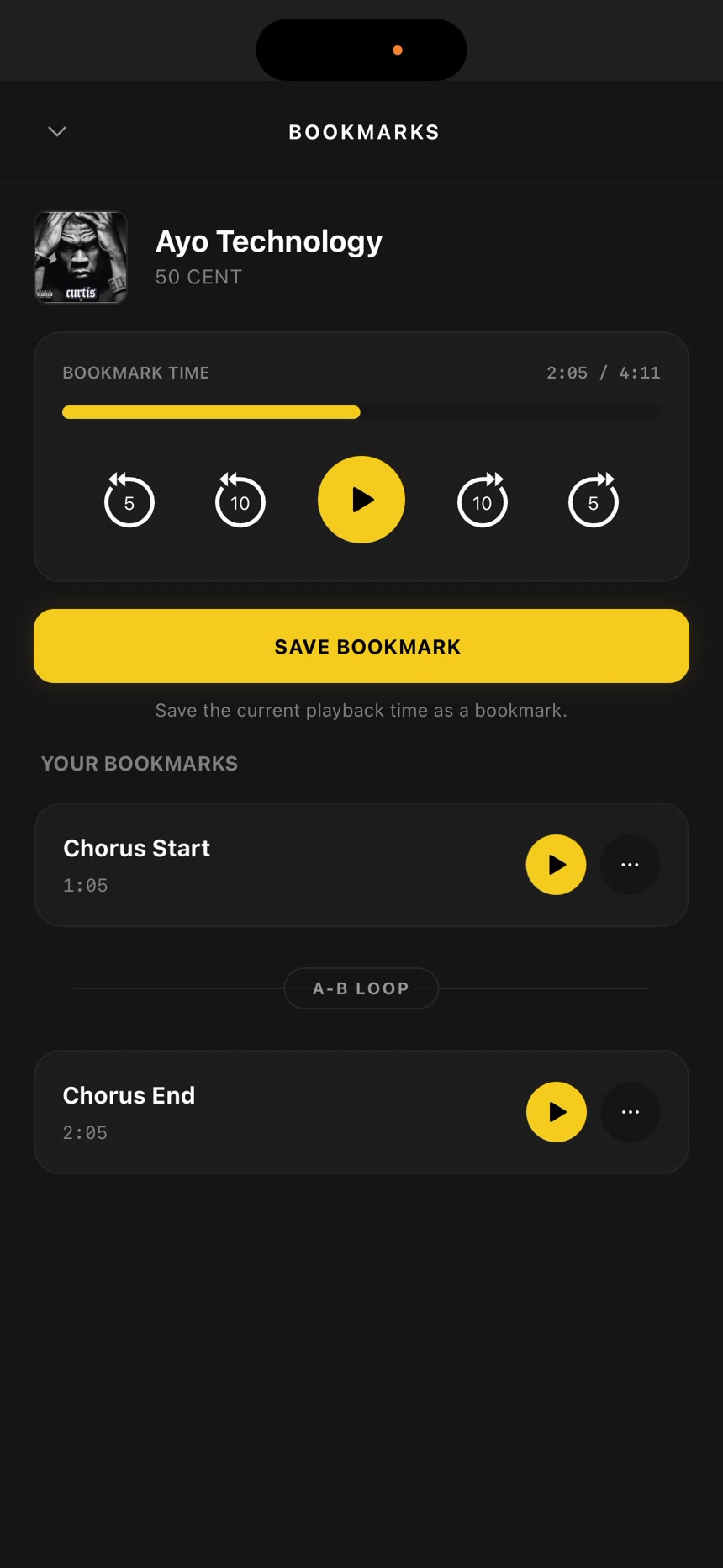
Tap a saved bookmark to replay a section without dragging the progress bar around.
Rename Later
Fix labels after you know what the moment represents: hook, drop, solo, bridge, phrase, or cue.
Delete Noise
Remove old markers when you no longer need them so the timeline stays readable.
Turn Two Bookmarks Into an A-B Loop
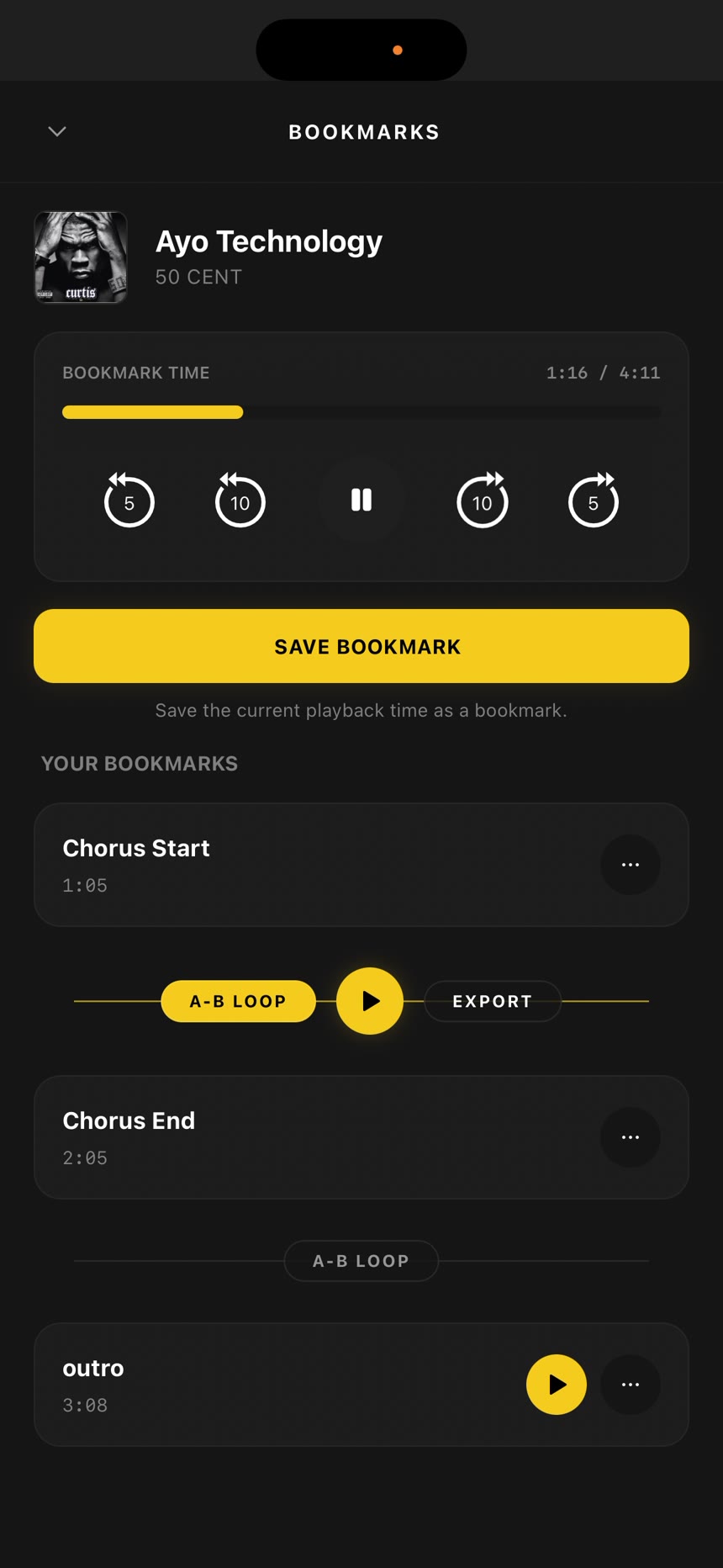
A-B looping is where Bookmarks become more than a jump list. Save one bookmark at the start of a section and another at the end. OfflineTunes shows an A-B Loop connector between adjacent bookmarks. Tap it to link the two points, then use the loop play button to repeat only that range.
The "adjacent" part is useful. It keeps ranges understandable. If you save "Chorus Start" and "Chorus End" next to each other, the loop is obviously the chorus. If you later add "Solo" after that, it gets its own nearby connector instead of turning the whole song into a confusing web of ranges.
Why short loops are better
The best practice loops are short enough to repeat without losing focus. For instrument practice, that might be one bar, one lick, one transition, or one chorus entrance. For language study, it might be one phrase. For DJ prep, it might be an intro or outro section. Long loops are still useful, but short loops make mistakes easier to hear.
If a loop feels almost right but the timing is rough, make a new bookmark a little earlier or later and remove the old one. Scrubbing is still available, but bookmarks give you a cleaner way to keep good start and end points once you find them.
Export a Loop When You Need a Standalone Section
Loop playback is enough when you are practicing inside OfflineTunes. Sometimes you need the section as its own file. The demo shows an Export button beside a linked A-B loop. On supported devices and supported track formats, OfflineTunes can trim the range between the two bookmarks, preserve useful tag context, and send the exported section through the app import/share flow.
This is useful when a short section becomes its own tool: a practice clip, a language drill, a rehearsal cue, a DJ prep note, a class example, or a small reference file. Keep the original full track, but export the section when repeating the whole song is wasting time.
Export is not the first step
Do not export every bookmark. Use export only after a loop proves useful. Most saved moments are better as navigation points. Export makes sense when the section is something you want outside the full track: a repeat drill, an edited rehearsal clip, or a reference segment you will play often.
Bookmarks Use Cases
The feature is simple enough for casual listening and precise enough for power users. Any time you care about a location inside an audio file, bookmarks save time.
Instrument practice
Save the start and end of a hard guitar riff, drum fill, piano run, bass transition, vocal phrase, or production detail. Loop it until your hands or ears understand it. Name markers by task, not by mood: "Solo Start", "Solo End", "Bridge Chords", "Fast Run", "Bad Timing", or "Practice Slow".
Language study and spoken audio
Bookmarks work well for language files, lectures, interviews, and spoken lessons in your local library. Mark the exact phrase, link a short A-B loop, then repeat it until pronunciation or meaning clicks. Export a small drill only when you want it as its own practice file.
DJ prep and cue mapping
Local libraries often contain extended mixes, rips, remasters, edits, and live versions. Bookmarks can mark intros, drops, breakdowns, clean exits, vocal starts, and outro points. That does not replace a full DJ app, but it gives your offline music library a fast cue map for listening and planning.
Choreography, workouts, and rehearsal
If timing matters, bookmarks help. Save where the routine starts, where the energy changes, where the count resets, and where a transition needs work. Use an A-B loop for the transition instead of starting the whole track over.
Music discovery notes
When you are going through a new album, bookmarks can mark why a song grabbed you: great hook, strong drums, sample idea, bad mix, standout bridge, or one section worth revisiting. Later, those labels explain your own listening history better than star ratings alone.
Best Practices for Useful Bookmarks
A bookmark system stays useful when it stays readable. Too many vague markers turn into clutter. A few named markers turn a long file into a map.
The Full Bookmark Workflow
Here is the cleanest way to use Bookmarks when you are learning, reviewing, or preparing local audio.
- 1Play the track normally.Do not start with a plan to mark everything. Wait until a moment is worth saving.
- 2Open Bookmarks at the moment.Use the bookmark button from the player or the track menu when you need the bookmark sheet.
- 3Fine tune the timestamp.Use the skip controls or scrubber to land near the exact start point.
- 4Save and name it.Use names that still make sense next week: Chorus Start, Solo End, Loop A, Loop B, Bridge, Drop.
- 5Add an end point if you need a loop.Save the end marker, tap A-B Loop between the two bookmarks, and play the range.
- 6Export only if the section deserves its own file.Keep navigation bookmarks as bookmarks. Export reusable drills, cue clips, and rehearsal sections.
Where Bookmarks Fit in OfflineTunes
Bookmarks are part of a bigger OfflineTunes idea: your local library should be more useful than a folder of files. Library organization gives you structure. ReplayGain keeps playback volume sane. FineTune helps decide what stays. Bookmarks make individual tracks easier to navigate, practice, and reuse.
That combination is important for people who own their files. Streaming apps are built around access. OfflineTunes is built around control: files, tags, folders, queues, playlists, EQ, ReplayGain, FineTune, and now exact moments inside tracks.
If you only listen front to back, bookmarks can stay out of your way. But if you practice, study, rehearse, prep mixes, repeat sections, or keep a serious local library, Bookmarks turn your songs into something closer to working material.
Bottom line
Bookmarks are for exact moments. A-B Loop is for repeating the useful range between two moments. Export is for turning that range into a reusable file when the loop becomes more useful than the full track.